
Download Storytailor – Personalized AI Storytelling for Kids
Overview
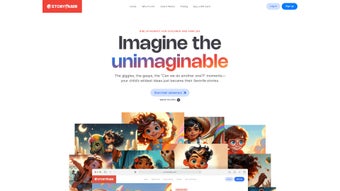
Storytailor is an innovative AI‑powered web application that puts the magic of storytelling directly into the hands of parents, teachers, and caregivers. Designed specifically for children ages 3‑8, the platform generates fully customized narratives that reflect a child’s favorite characters, settings, themes, and tones. By allowing the user to define traits such as bravery, curiosity, or kindness, Storytailor creates stories that feel uniquely personal, fostering a deeper emotional connection and encouraging language development.
The tool goes beyond a single tale: each story can be expanded into sequels, letting young readers follow beloved protagonists on new adventures. Accompanying each narrative is custom artwork that matches the story’s mood and interactive activities—puzzles, word games, and drawing prompts—that reinforce comprehension and vocabulary. Storytailor offers a free Starter plan that provides a limited number of stories per month, while the premium Storyteller plan unlocks unlimited creations, higher‑resolution illustrations, and advanced editing options.
The platform’s commitment to diversity and inclusivity shines through its extensive library of cultural settings and character options, ensuring that every child can see themselves reflected in the stories they read. In short, Storytailor transforms the timeless tradition of bedtime storytelling into a modern, educational experience that is both secure and easy to use.
Key Features of Storytailor
- AI‑Generated Personalization: Input a child’s name, favorite animal, preferred setting, and desired moral lesson; the engine crafts a story that feels tailor‑made.
- Sequels & Series Builder: Create follow‑up chapters that maintain continuity, letting characters grow and adventures evolve over time.
- Custom Artwork: Every story is paired with original illustrations generated to match tone, characters, and setting, enhancing visual engagement.
- Interactive Learning Activities: Built‑in puzzles, word‑matching games, and drawing prompts reinforce language skills and critical thinking.
- Diverse Character Library: Choose from a wide range of cultural backgrounds, abilities, and family structures to promote inclusivity.
- Free Starter Plan: Access up to five personalized stories per month at no cost, perfect for trial and occasional use.
- Premium Storyteller Plan: Unlimited story generation, high‑resolution art, advanced tone controls, and priority support for $9.99 USD per month.
- Secure Cloud Storage: All stories are saved securely in the user’s account, accessible from any device with an internet connection.
- Multi‑Device Sync: Seamlessly switch between desktop browsers, tablets, and smartphones without losing progress.
- Export Options: Download stories as PDF or EPUB for offline reading, printing, or sharing with family members.
Installation & Usage Guide
Getting started with Storytailor is straightforward and requires no complex installation. Follow these steps to begin creating personalized tales for your child:
- Visit the Official Website: Open any modern browser (Chrome, Firefox, Safari, Edge) and navigate to www.storytailor.com. The site is fully responsive, meaning it adapts to desktop, tablet, and mobile screens.
- Create an Account: Click the “Sign Up” button, enter a valid email address, choose a secure password, and confirm your account via the verification email. Parents can also link the account to Google or Apple for quicker access.
- Select a Plan: Choose the free Starter plan to explore the basics or upgrade to the Storyteller plan for unlimited stories. Payment for the premium plan is processed securely through Stripe or PayPal.
- Start a New Story: From the dashboard, click “Create New Story.” A guided form appears where you input the child’s name, preferred age range, favorite animals, desired setting (e.g., enchanted forest, space station), and the moral or theme you’d like to emphasize.
- Customize Tone & Length: Use sliders to adjust the story’s tone (playful, adventurous, calm) and length (short 5‑minute read or extended 15‑minute chapter). The AI instantly generates a preview.
- Review & Edit: Read the generated text. If needed, you can edit sentences directly in the built‑in editor, add or remove characters, or tweak the ending. The system retains the original AI logic, ensuring consistency.
- Generate Artwork: Once satisfied, click “Add Illustrations.” The AI creates matching images, which you can shuffle, replace, or upscale for premium users.
- Interactive Activities: Enable optional activities by toggling the “Learning Mode” switch. The platform adds a short puzzle or vocabulary game at the story’s conclusion.
- Save, Share, or Export: Press “Save to Library” to keep the story online, “Share” to send a link via email or messaging apps, or “Export” to download a PDF/EPUB file for offline reading.
- Continue the Adventure: Use the “Create Sequel” button on any saved story to extend the narrative, maintaining character continuity and plot threads.
The entire workflow typically takes under five minutes, making Storytailor an efficient tool for busy parents who still want to provide a personalized reading experience. Because everything runs in the browser, there’s no need for additional plugins or software updates beyond standard browser maintenance.
Compatibility, Pros & Cons, FAQ, and Conclusion
Storytailor is a web‑based application and works on any device with a modern browser, including Windows 10/11, macOS 10.15+, Linux distributions, iOS 13+, Android 9+, as well as ChromeOS and tablets. No native app download is required, which means the platform remains lightweight, secure, and instantly up‑to‑date.
Pros
- Highly personalized stories that boost emotional engagement.
- AI‑generated custom artwork adds a visual dimension.
- Interactive activities reinforce language learning.
- Free starter tier makes it accessible for casual users.
- Cross‑device sync ensures seamless continuation of projects.
Cons
- Premium features require a monthly subscription.
- Complex story customization may overwhelm very young parents without guidance.
- Internet connection is required for story generation.
Frequently Asked Questions
Is Storytailor safe for children?
Yes. All data is encrypted in transit and stored on secure servers. The platform complies with COPPA and GDPR‑Kids guidelines, and there are no third‑party ads or in‑app purchases for the free tier.
Can I use Storytailor offline?
Stories can be exported as PDF or EPUB, which can then be read offline on any device. However, the AI generation and artwork creation require an active internet connection.
How many stories can I create on the free plan?
The Starter plan allows up to five fully personalized stories per month, including basic illustrations and one activity per story.
Do I need any technical skills to use Storytailor?
No technical expertise is required. The interface is guided step‑by‑step, and the AI handles all complex writing and illustration tasks.
What payment methods are accepted for the premium plan?
Storytailor accepts major credit cards, PayPal, and Apple/Google Pay for a hassle‑free subscription experience.
Final Verdict
Storytailor successfully bridges the gap between classic bedtime storytelling and modern educational technology. Its AI‑driven personalization delivers narratives that feel handcrafted, while the integrated artwork and interactive activities add layers of engagement that traditional books often lack. Parents and educators will appreciate the free tier for occasional use, and the reasonably priced premium plan offers enough depth for daily storytelling routines. The only notable drawbacks are the reliance on an internet connection and the subscription cost for power users. Overall, Storytailor is a valuable, secure, and enjoyable tool that encourages children to love reading and imagination.
Ready to spark your child’s imagination? Sign up for the free Starter plan today or upgrade to the Storyteller plan for unlimited adventures.



.png)



